Chapters
- 1 Getting started
- 2 The interface
- 3 Coordinate systems and conventions
- 4 Modelling
- 5 Materials
- 6 Sections
- 7 Supports, releases and modifiers
- 8 Loads
- 9 Load combinations
- 10 Meshing
- 11 Static analysis
- 12 Dynamic and seismic analysis
- 13 Results
- 14 Design
- 15 Scripting and the AI model builder
- 16 Import and export
- 17 Verification
- 18 Scope and limits
- 19 Troubleshooting
- 20 Glossary and notation
On this page
Everything you can do with the mouse can also be written as a script: build a model, load it, run any analysis, read the results and design the members. Scripts are written in Python or JavaScript against one interface, the tn module, and run in the script console of the FEA Tool. The AI model builder writes such a script from a description in plain words. This chapter covers the console, the tn interface with examples, the plane-frame interface for existing scripts, and the AI model builder. The complete generated list of functions is on the developer page.
15.1 The script console
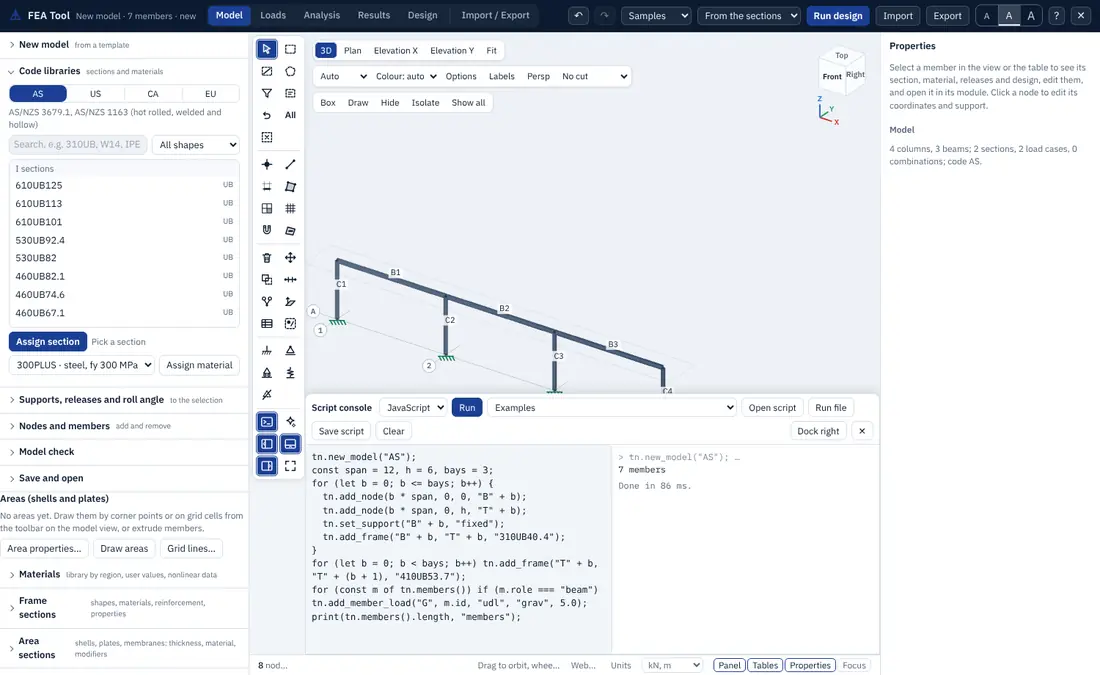
Open the console with the Script console button of the modelling toolbar or the key `. It docks below the model view (or on the right with Dock right) and has:
- a language choice, Python or JavaScript;
- Run, which runs the script in the editor;
- Examples, with a slab on a steel frame and an industrial building with trusses, a roof slab and wind, in both languages;
- Open script, Run file and Save script for
.pyand.jsfiles; a script file dropped on the console or the model view opens in the right language; - Clear for the output, and Retry Python when the Python engine could not be loaded.
JavaScript runs at once. Python runs in Pyodide, a build of CPython for the browser, which loads on first use (from the TensorNode site, or from a public CDN when the site does not serve it). A whole script run is one undo step, and after the run the title, panels and view refresh.
15.2 Conventions of the tn interface
- Units are kN, m, kPa and MPa. In section sizes, a value above 5 is read as millimetres; in thicknesses of areas and covers, a value above 0.5.
- Ids are strings. Where objects are asked for, you can give one id, a list of ids,
"all","selected"or a section name (all members or areas with that section). - Arguments can be positional or named. In Python,
tn.add_shell(nodes, "S1", mesh=0.5); in JavaScript, one object:tn.add_shell({ nodes: [...], section: "S1", mesh: 0.5 }). - Asynchronous calls:
tn.run()andtn.design()return when the analysis or design has finished; writeawaitbefore them, in Python as in JavaScript. - Help:
tn.help()prints every function with its parameters and aliases, andtn.help("shell")filters the list. A misspelt name is answered with the nearest valid one (tn.add_shelsuggestsadd_shell), and so are unknown options, load cases, sections, joint patterns, members and areas.
15.3 The tn functions
| Function | Purpose |
|---|---|
new_model(code, name) | an empty model for AS, US, CA or EU, with load patterns G and Q |
set_title(name) | the model name |
add_node(x, y, z, id) | a node; returns its id (an existing node at that point is reused) |
add_frame(i, j, section, id, material, type, role, beta) | a member between two nodes (ids or [x, y, z]); type frame or truss; role beam, column or brace; roll angle |
set_support(nodes, kind) | fixed, pinned, roller, free, a code such as FFFRRR, or six true/false values |
set_spring(nodes, k) | node springs [kx, ky, kz, krx, kry, krz] (kN/m, kNm/rad) |
set_release(members, start, end, both) | end releases: pinned, m33, m22, torsion, a list, or six true/false values; fixed clears |
set_section(members, name) | a library section, your own section, an auto-select list or a name such as 300x500RC |
assign_material(members, name) | a library material or one you added |
delete(items), select(items), selection() | delete, select, and read the selection |
| Function | Purpose |
|---|---|
add_material(name, type, E, nu, rho, fy, fu, fc, alpha, ...) | a material from the library by name, or with explicit values |
add_frame_section(name, shape, d, b, tf, tw, t, material) | a section by shape: rect, circle, I, box, pipe, channel, tee, angle |
add_rect_section, add_box_section, add_pipe_section, add_i_section | shortcuts for those shapes |
add_rc_section(name, b, d, material, role, cover, bar_dia, n_bars, tie_dia, tie_spacing, top_bars, bot_bars) | a reinforced concrete rectangle for the RC design |
add_auto_select(name, sections) | an auto-select list |
add_area_section(name, type, material, t, tb, modifiers) | an area section: shell-thin, shell-thick, plate-thin, plate-thick or membrane |
add_shell, add_slab, add_plate, add_wall, add_membrane (nodes, section, mesh, id, t, material, ...) | an area of that kind; the mesh is a size in m, [nx, ny] or "auto" |
add_area(nodes, t, material, type, id, section, mesh) | an area with a thickness and type |
mesh_area(areas, size, by_edge_points, by_frame_intersections) | the mesh of areas |
set_modifiers(items, ...) | property modifiers of areas (f11 ... weight) or frames (A ... weight), or of a section |
| Function | Purpose |
|---|---|
add_load_case(name, type, self_weight) | a load pattern: dead, live, roof, snow, wind, seismic, temperature or other, with its self weight multiplier |
add_nodal_load(case, node, fx, fy, fz, mx, my, mz) | a joint force and moment in global axes |
add_member_load(case, member, kind, dir, w, P, a, b, w2) | udl, point or trap; direction grav, gx, gy, gz or local |
add_joint_pattern(name, A, B, C, D, clip, frame) | a joint pattern (Section 8.6) |
add_area_load(case, area, q, dir, kind, face, proj, pattern, hydro, wind) | an area load: uniform, pressure, pattern, hydrostatic or wind |
add_combo(name, factors, kind) | a combination {case: factor}, kind strength or service |
generate_combos(code, method, replace) | the combinations of a code from the pattern types |
| Function | Purpose |
|---|---|
replicate(items, mode, dx, dy, dz, n, cx, cy, deg, axis, coord, loads, supports) | linear, radial or mirror copies |
divide_frame(member, n, at) | n equal parts, or at fractions such as at=[0.25, 0.5] |
move(items, dx, dy, dz) | move nodes, or the nodes of members and areas |
select_by_coordinates(x, y, z, tol, kind) | select by coordinate ranges, each a value, [low, high] or omitted |
| Function | Purpose |
|---|---|
run(analysis, options) | "linear", "p-delta", "buckling", "modal", "response-spectrum", "time-history", "nonlinear" and the other types; returns {ok, cases, messages} |
results(kind, case, id) | "disp", "reactions", "members", "areas" or "cases" |
displacements(case, node) | {node: [ux, uy, uz, rx, ry, rz]} in m and rad, or one list for one node |
reactions(case, node) | {node: [Fx, Fy, Fz, Mx, My, Mz]} |
member_forces(case, member) | the station values of P, V2, V3, T, M2, M3 of one member |
area_forces(case, area) | the forces, moments and stresses of one area |
design(options) | designs the members; returns {ok, rows, failing, changed} with rows {id, section, util, status} |
nodes(), members(), areas(), sections(), area_sections(), materials(), model() | the model as dictionaries |
refresh() | redraw the view and the panels |
15.4 Examples
A three-bay frame, analysed and designed (Python).
tn.new_model("AS", "Three-bay frame")
span, bays, h = 8.0, 3, 3.6
for b in range(bays + 1):
    tn.add_node(b * span, 0, 0, f"B{b}")
    tn.add_node(b * span, 0, h, f"T{b}")
    tn.set_support(f"B{b}", "fixed")
    tn.add_frame(f"B{b}", f"T{b}", "310UC96.8", f"C{b}", role="column")
for b in range(bays):
    tn.add_frame(f"T{b}", f"T{b+1}", "410UB53.7", f"G{b}", role="beam")

tn.add_member_load("G", "410UB53.7", "udl", "grav", 5.0)   # every beam
tn.add_member_load("Q", "410UB53.7", "udl", "grav", 10.0)
tn.generate_combos("AS")

r = await tn.run("linear")
print(r["ok"], len(r["cases"]), "cases and combinations")
f = tn.member_forces("AS (b) 1.2G + 1.5Q", "G1")
print("largest M3 in G1:", max(f["M3"]), "kNm")

d = await tn.design()
for row in d["rows"]:
    print(row["id"], row["section"], round(row["util"], 2), row["status"])
A hand check of the middle beam: for the factored load kN/m plus the self weight gives about 170 kNm as a simply supported span; the frame moment at midspan is lower because the columns and the next spans restrain the ends.
The same frame in JavaScript.
tn.new_model("AS");
const span = 8, h = 3.6, bays = 3;
for (let b = 0; b <= bays; b++) {
  tn.add_node(b * span, 0, 0, "B" + b);
  tn.add_node(b * span, 0, h, "T" + b);
  tn.set_support("B" + b, "fixed");
  tn.add_frame("B" + b, "T" + b, "310UC96.8", "C" + b);
}
for (let b = 0; b < bays; b++) tn.add_frame("T" + b, "T" + (b + 1), "410UB53.7", "G" + b);
for (const m of tn.members()) if (m.role === "beam") tn.add_member_load("G", m.id, "udl", "grav", 5.0);
const r = await tn.run("linear");
print(tn.reactions(r.cases[0]));
A slab on a steel frame with a pattern load (Python).
tn.new_model("EU", "Slab")
for x, y in [(0, 0), (6, 0), (6, 4), (0, 4)]:
    tn.add_node(x, y, 0, f"P{x}{y}")
    tn.add_node(x, y, 3.5, f"S{x}{y}")
    tn.set_support(f"P{x}{y}", "fixed")
    tn.add_frame(f"P{x}{y}", f"S{x}{y}", "HEB 200")
tn.add_area_section("SLAB200", "shell-thin", "C30/37", 0.2)
tn.add_slab(["S00", "S60", "S64", "S04"], "SLAB200", mesh="auto")
tn.add_area_load("Q", "all", 3.0, "grav")
tn.add_joint_pattern("DRIFT", 0, 0.5, 0, 0, "positive")   # 0.5 kPa per metre along Y
tn.add_load_case("SNOW", "snow", 0)
tn.add_area_load("SNOW", "all", kind="pattern", pattern="DRIFT", dir="grav")
tn.generate_combos("EU")
await tn.run("linear")
print(tn.area_forces("Q", tn.areas()[0]["id"]).keys())
15.5 Scripts for existing plane-frame code
Scripts written for the open-source anastruct package (from anastruct import SystemElements) run unchanged in the console, and the same class exists in JavaScript as anastruct.SystemElements. A plane frame is built with add_element, supports and loads, solved with solve() and read back with reaction_forces, get_node_displacements and get_element_results. The show_structure, show_bending_moment, show_shear_force, show_axial_force, show_displacement and show_reaction_force calls place the frame in the 3D view (in the X-Z plane, in kN and m) and show the matching result of the TensorNode solver. The sign conventions of that package are kept: to the right, up, anticlockwise positive, and positive when the top of a left-to-right element is stretched.
15.6 The AI model builder
The AI model builder (the sparkle button of the modelling toolbar) turns a description into a tn script. Type what you want, for example a two-storey steel frame, three bays of 8 m, 3.6 m storeys, fixed bases, 5 kPa dead and 3 kPa live on 6 m wide floors, and the builder writes the script in Python (or JavaScript), lists the assumptions it made, and names any words it could not use. Run sends the script to the console; with Run automatically it runs at once. If the script stops with an error, the builder receives the message and the line, repairs the script and tries again, up to three times. It then reports the numbers of nodes, members, areas, load patterns and combinations, and selects the new model.
Three engines are available:
- Offline planner (always available): a parser of the description with templates for 2D and 3D frames, multi-storey buildings, flat slabs, pitched portals, Pratt, Howe and Warren trusses, simple, continuous and cantilever beams, shear and retaining walls, rectangular tanks, box culverts and staircases. Nothing leaves the browser.
- Your own API key for a hosted language model (Anthropic): the request goes from your browser to the provider with your key, which is kept only in your browser's local storage.
- The TensorNode server, when you are signed in and your plan includes it, with a monthly allowance.
What a generated script may do. Before a generated script runs, it is checked: it may use only tn, math, print and plain code (in Python, only tn and math may be imported), and every loop gets a time limit. JavaScript scripts run in a restricted scope that refuses the page, the network, storage and code generation. The script is shown in full before it runs, so you can read and change it.
Treat the generated model as a draft: check its geometry, sections, supports, loads and combinations against your brief before you rely on the results, as you would a model from a colleague.